v1.22.1 — Free for macOS, Windows & Linux

One window for all your servers

SSH terminal, remote file browser, live server monitoring, and Docker manager — all in one place. No agent required on the remote side.
⬇ Download Free GitHub →
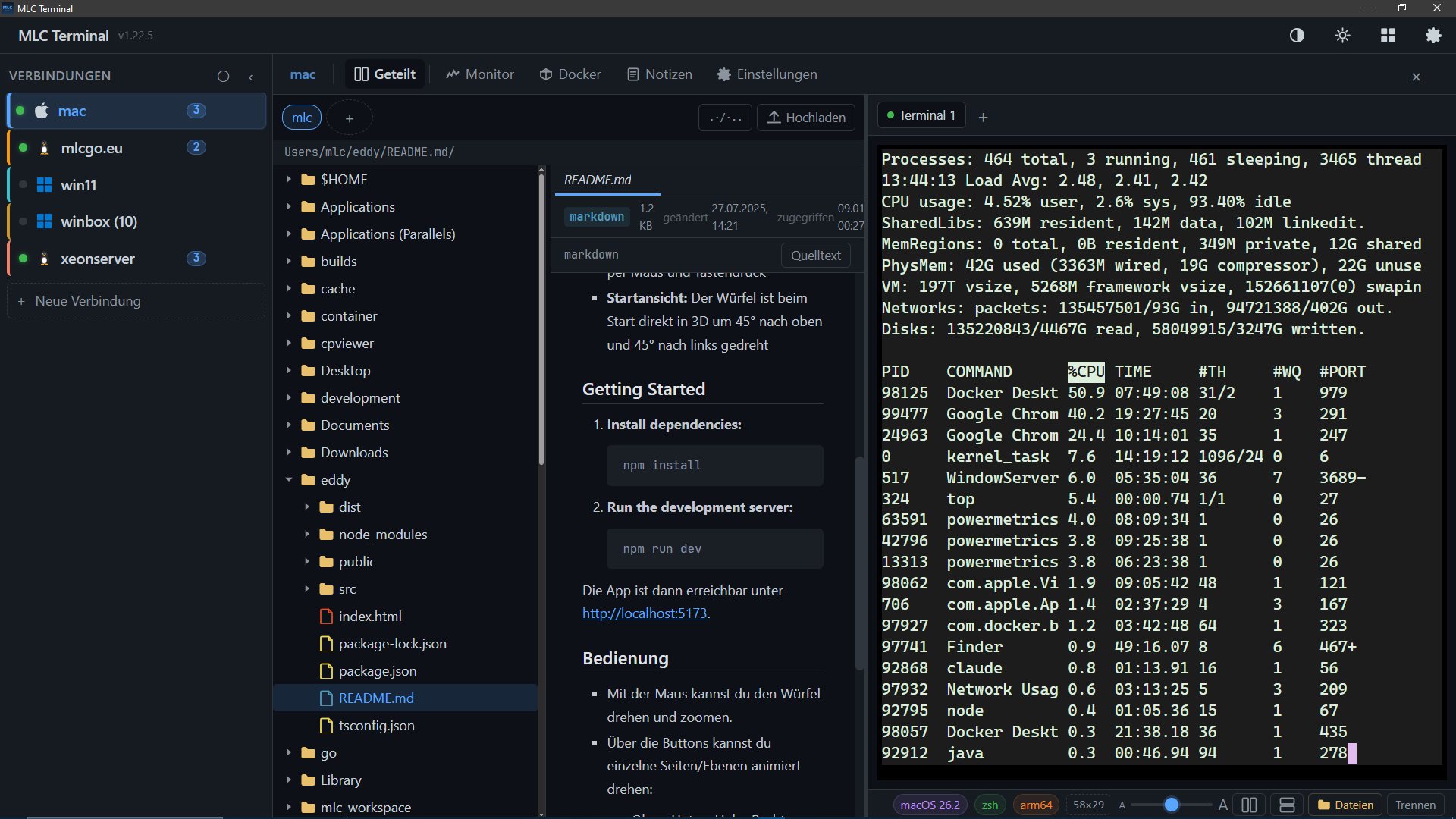
MLC Terminal — split view with SFTP file browser, markdown preview and live terminal

Terminal and files, side by side

Connect to any SSH server with a single click. Open as many terminals as you need per host — they share the underlying connection. Use split view to put a terminal and file browser side by side in one window.

  • Multiple terminals per host — all sharing one SSH connection
  • Built-in SFTP file browser — navigate, preview, edit, upload, download
  • Syntax-highlighted editor — edit config files directly on the server
  • Preview images, PDFs, Markdown, HTML, archives inline
  • Color-tag hosts by environment — production, staging, homelab
  • Auto-connect on startup for your most-used servers
Get MLC Terminal →
MLC Terminal split view — SFTP file browser on the left with image preview, terminal with top output on the right

See every server at a glance

The dashboard shows live CPU, memory, disk, and network for all connected hosts. No manual df -h or htop — just open the Monitor tab.

  • Live gauges — CPU, RAM, all disks, network throughput
  • 60-minute history with sparkline graphs — spot spikes after the fact
  • Works on Linux, macOS, and Windows remote hosts
  • No permanent agent — a small helper binary (~5 MB) is uploaded once via SFTP, run on demand, nothing stays running between polls
  • Dashboard overview — all hosts in one view, disconnected state clearly shown
MLC Terminal host overview showing system info: OS, architecture, kernel, shell and hostname

Manage containers without a separate dashboard

The Docker tab lists all containers — running, stopped, and paused — with status, image, uptime, and port mappings. Everything you need for day-to-day container work without opening Portainer or typing docker ps.

  • Start, stop, restart, remove containers with one click
  • Live log tailing with color output directly in the app
  • Interactive shell inside any container — uses the terminal you already have open
  • Port mapping display — see which ports are exposed at a glance
  • Toggle stopped containers — hide or show them with one switch
MLC Terminal Docker tab showing container list with status, image names, port mappings and action buttons

Stop juggling four different tools

Everything you need for remote server work, in one window.

Terminal / PuTTY / iTerm2
→ replaced by
🖥 SSH Terminal tabs
WinSCP / Cyberduck / SFTP Drive
→ replaced by
📂 Built-in file browser
htop / glances / Netdata
→ replaced by
📈 Monitor tab — live CPU, RAM, disk, network
Portainer / Lazydocker
→ replaced by
🐳 Docker tab
Sticky notes for server addresses
→ replaced by
🏷 Grouped sidebar with color tags
Notepad / text file per server
→ replaced by
📝 Per-host notes (Markdown, auto-save)
Platforms

macOS · Windows · Linux

Available in 6 languages: English, German, French, Spanish, Portuguese, and Bavarian.

🍎
macOS
Apple Silicon + Intel
.app bundle & .dmg
🪟
Windows
Windows 10 / 11 (x64)
.exe installer
🐧
Linux
x86-64
Native binary + RPM
⬇ Download MLC Terminal — Free No telemetry. No cloud account. No data leaves your machine.

Private by design

🔐 SSH passwords encrypted with AES-GCM before being written to the local database — never stored in plaintext
🔑 SSH private keys stay on your machine — only public authentication is sent over the wire
🛡 SSH host key fingerprints verified on first connect — changes are flagged as a warning
🚫 No telemetry, no cloud account required — no data leaves your machine